D2DHQ Follow-Up SMS — Opt-In Consent Flow
Public evidence page for A2P 10DLC campaign review (The Campaign Registry).
Last updated: May 13, 2026
About this page
D2DHQ is a software platform for door-to-door (D2D) sales teams. The “D2DHQ Follow-Up” SMS program lets a homeowner who has just had an in-person conversation with a sales representative receive a small number of follow-up text messages from the same representative about the products or services they discussed. This page documents exactly how the homeowner gives consent, so campaign reviewers can verify the opt-in flow without needing to install the iOS app.
Consent is collected in person, on a rep’s iPhone running the D2DHQ Knocker iOS app— not on a public website and not by a keyword. This is an offline / in-app opt-in path. We also operate a double opt-in: after the in-app signature, an automated verification SMS is sent to the number the homeowner just entered, and the homeowner must reply YES from that phone before any follow-up messages are sent.
Step-by-step opt-in flow
- A sales representative employed by a D2DHQ customer organization knocks on a homeowner’s door and has a face-to-face conversation about the product or service.
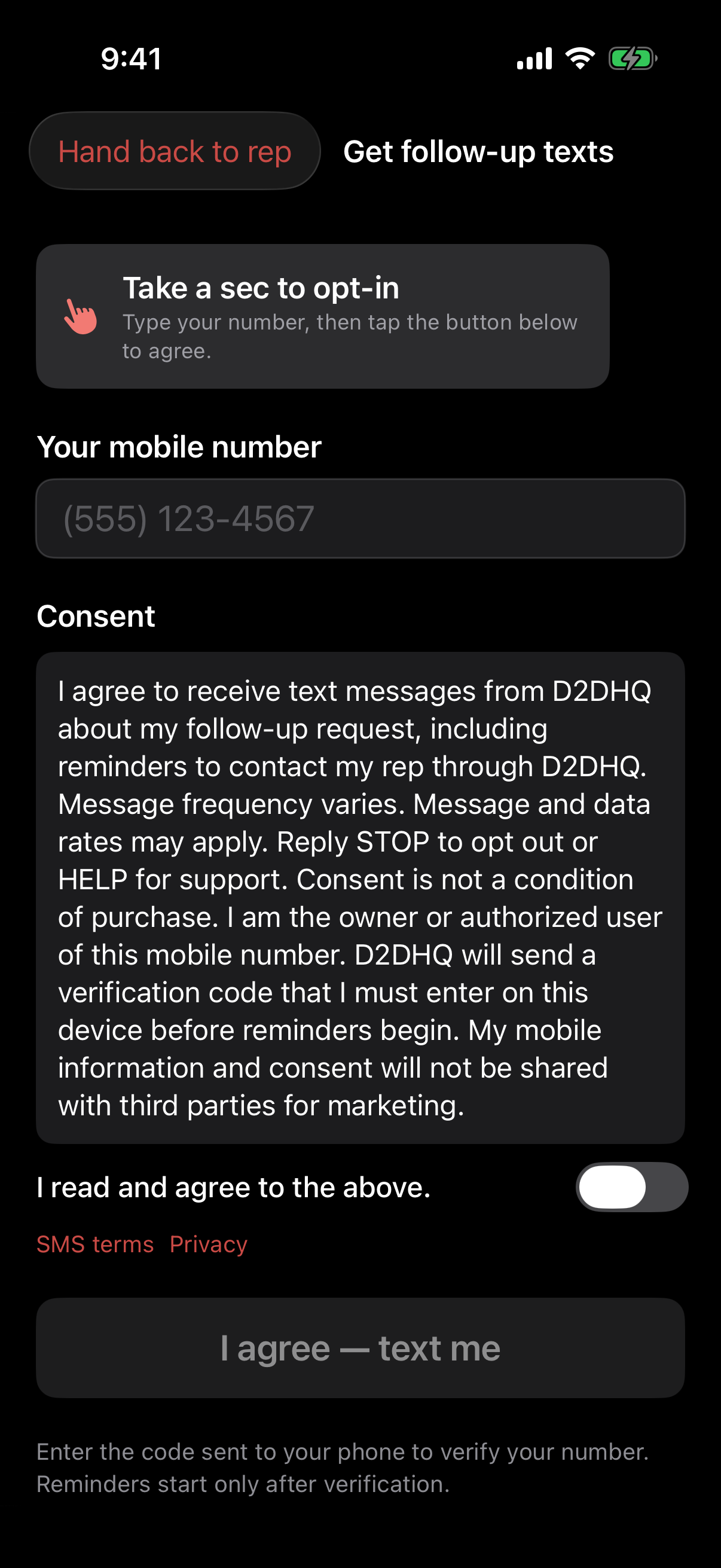
- If the homeowner asks to be contacted later, or if the rep asks and the homeowner agrees, the rep opens the in-app “Get text consent from homeowner” sheet and physically hands the iPhone to the homeowner.
- The homeowner enters their ownmobile phone number into the input field. The rep does not type the number on the homeowner’s behalf.
- The homeowner reads the full on-screen consent statement (verbatim text below).
- The homeowner toggles “I read and agree to the above.” This toggle is unchecked by default; active consent is required.
- The homeowner taps the “I agree — text me” button. The button is disabled until both (a) a valid 10-digit phone number is entered and (b) the agreement toggle is on.
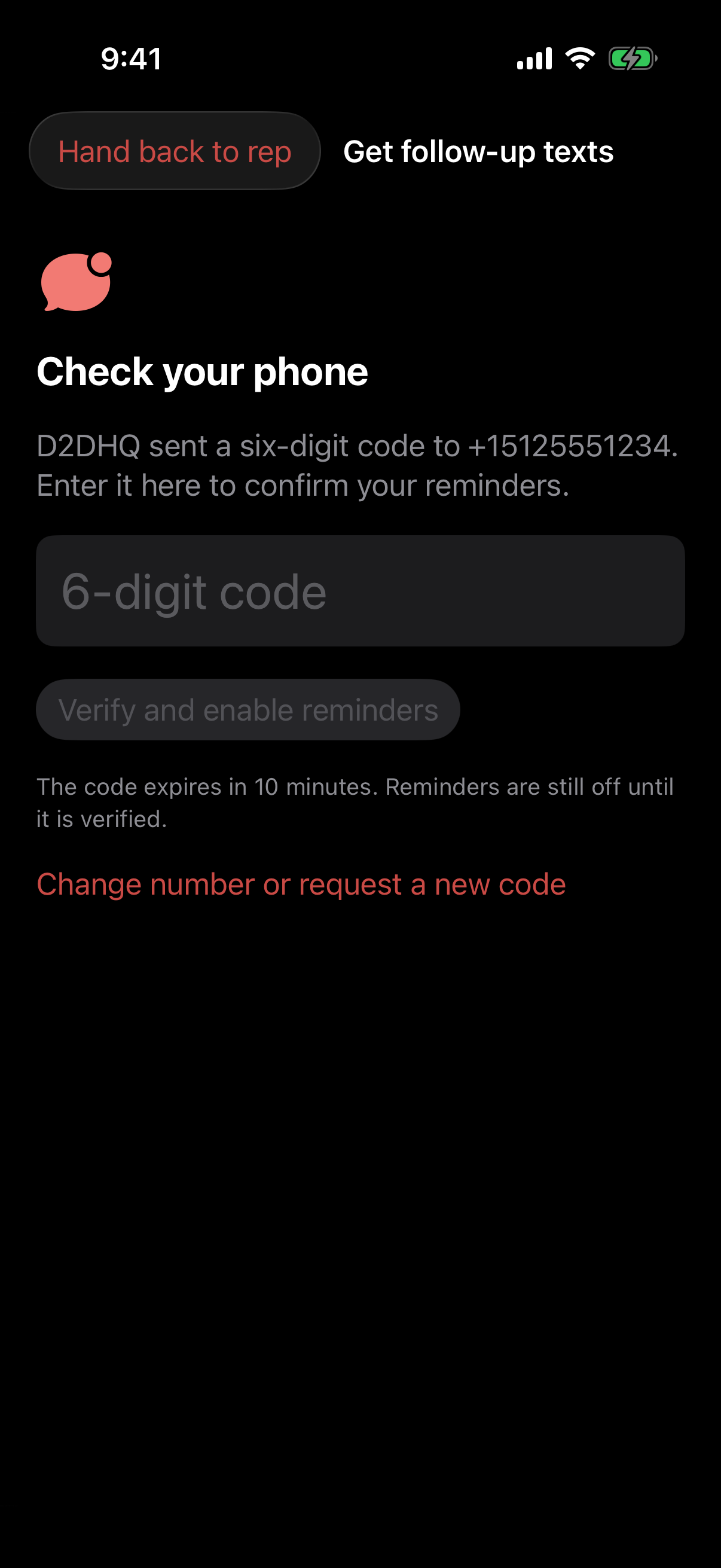
- D2DHQ records the consent signature server-side (timestamp, phone number, consent text, rep id, organization id, building / address). The backend immediately sends a verification SMS to the homeowner’s phone.
- The verification SMS reads: “{Organization Name} via D2DHQ: {Rep first name}just spoke with you and asked if we could text a follow-up. Reply YES to confirm or STOP to opt out. Msg & data rates may apply.”
- The homeowner replies YES from their own phone. Only then is the consent marked confirmed. No automated follow-up messages are sent until this YES reply is received. If the homeowner replies STOP instead, the phone number is added to the opt-out list and all pending jobs are cancelled immediately.
Exact consent text shown to the homeowner
“I agree to receive follow-up text messages from {Organization Name}via D2DHQ about today’s conversation. I understand message and data rates may apply, message frequency varies(typically 0–4 messages over 72 hours), and I can reply STOP at any time to opt out, or HELP for support. My phone number will not be sold or shared with third parties. I will receive a confirmation text shortly that I must reply YESto before any follow-up messages are sent.”
{Organization Name}is replaced at runtime with the legal or DBA name of the D2DHQ customer organization the rep works for. D2DHQ is the registered brand sending the message on the organization’s behalf.
Screenshots of the in-app consent flow
The screenshots below show the consent screen exactly as the homeowner sees it on the rep’s iPhone running the D2DHQ Knocker iOS app. The phrase “from Admin via D2DHQ” in the on-screen consent box reflects a development-environment organization labeled “Admin”; in production this token is replaced at runtime with the actual D2DHQ customer organization the homeowner just spoke with at the door (e.g. “from Acme Fiber Co. via D2DHQ”).


Required disclosures (plain-text summary)
- Program name: D2DHQ Follow-Up.
- Brand: D2DHQ, operated by East Holdings LLC.
- Use case: A small follow-up sequence after an in-person door-to-door sales conversation, sent on behalf of the D2DHQ customer organization the homeowner just spoke with.
- Message frequency:Message frequency varies. A typical follow-up sequence is 0–4 messages over 72 hours. Additional messages are only sent if the homeowner replies and asks for more information.
- Cost: Message and data rates may apply.
- HELP keyword: Replying HELP returns: “D2DHQ Follow-Up: [email protected]. Reply STOP to opt out. Msg & data rates may apply.”
- STOP keyword: Replying STOP, STOPALL, UNSUBSCRIBE, CANCEL, END, or QUIT revokes consent immediately. Carrier-standard STOP confirmation is delivered by the carrier; D2DHQ also cancels all pending follow-up jobs on the affected phone number.
- No third-party sharing: Mobile phone numbers, opt-in data, and SMS consent records collected through the D2DHQ Follow-Up program are never sold, rented, leased, or shared with third parties for their own marketing, advertising, or list-building purposes. No mobile information will be shared with third parties or affiliates for marketing or promotional purposes.
- Privacy policy: https://www.d2dhq.com/privacy
- Terms of service: https://www.d2dhq.com/terms
Sample messages
The four sample messages below match, verbatim, the four samples registered for this campaign with The Campaign Registry. They are presented here in send order. Names (“Sunrise Solar,” “Mike,” “John”) are illustrative; in production these tokens are replaced at send time with the actual D2DHQ customer organization, the rep’s first name, and the homeowner’s first name.
- Sample #1 — Verification SMS (sent immediately after the in-app signature; no further messages until homeowner replies YES)“Sunrise Solar via D2DHQ: Mike just spoke with you and asked if we could text a follow-up. Reply YES to confirm or STOP to opt out. Msg & data rates may apply.”
- Sample #2 — Opt-in confirmation (auto-reply sent the moment the homeowner replies YES)“D2DHQ: You’re confirmed for follow-up texts about your in-person conversation. Up to 4 messages per follow-up sequence. Msg & data rates may apply. Reply HELP for support, STOP to opt out anytime.”
- Sample #3 — Follow-up re-engagement (sent only to a homeowner who completed the double opt-in)“Sunrise Solar via D2DHQ: Following up — wanted to make sure you saw the rundown: https://www.d2dhq.com/h/abc123 — Mike. Msg & data rates may apply. Reply STOP to opt out.”
- Sample #4 — Initial follow-up with the info discussed at the door (sent within 24 hours of the in-person conversation, after YES)“Sunrise Solar via D2DHQ: Hey John, thanks for the chat earlier. Here’s the rundown I mentioned: https://www.d2dhq.com/h/abc123. Happy to answer anything — just reply. — Mike. Msg & data rates may apply. Reply STOP to opt out.”
Every template ends with “Reply STOP to opt out.” per A2P 10DLC best practices.
Why the opt-in cannot be seen at a public URL
D2DHQ Follow-Up is not a self-service consumer signup. A homeowner cannot navigate to a D2DHQ web page and opt in on their own — consent is only collected through a live, in-person conversation with a sales representative who is physically at the homeowner’s door, using the D2DHQ Knocker iOS app. The screenshots above are the publicly accessible record of that flow. Reviewers who want to inspect the source can contact us at [email protected] for a recorded walkthrough of the iOS app.
Contact
D2DHQ · East Holdings LLC
Support: [email protected]
Privacy: /privacy · Terms: /terms